

How Data Connectors Work ?
Zeromagic’s Data Connector page provides a central location to manage your data connections.1. Data Sources
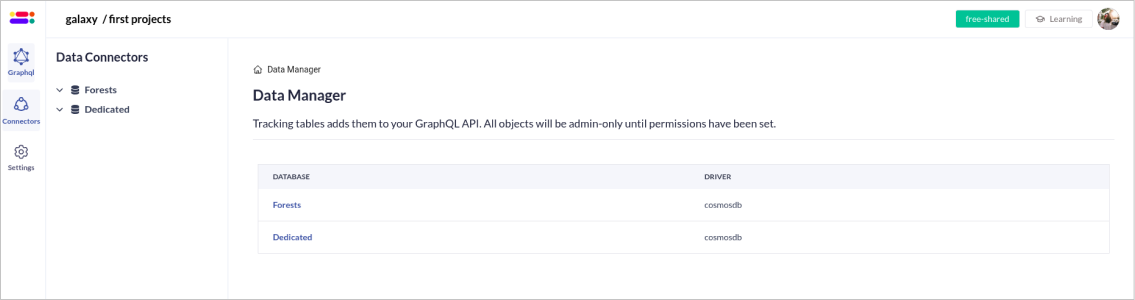
Upon navigating to the Data Connectors page, you’ll be presented with a list of available data sources. All the data sources available in theDatabase section of the project console will be displayed here.
Data sources
Refer the docs to learn about data sources
2. Tables within Data Sources
When you click on a specific data source, you’ll be prompted to aData Manager Page. This page consists of List and Not Listed tabs.
- Listed: Shows all the tables which have logical models that are listed in that data source.
- Not Listed: Shows all the tables which are not listed within that data source.
3. Creating Logical Models
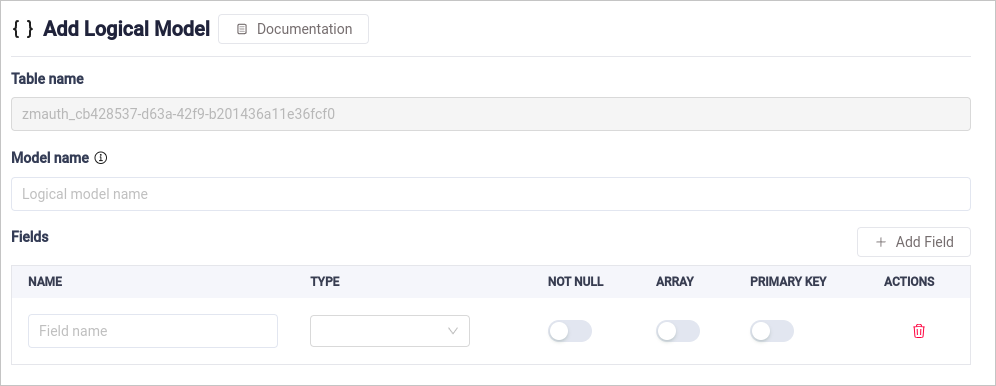
Logical models represent the structure and relationships of your data, enabling you to define how data should be queried and manipulated through the GraphQL API.-
Select a Table: In the
Not Listedtable select a table, click onlistto create a logical model. - Define Logical Model: Provide the necessary details for the logical model, such as field names, data types, and relationships with other models.
- Create Logical Model: Create the logical model to generate the corresponding schema
Each Logical model must have a primary key field.
4. Schema Generation
Once a logical model is created, the system automatically generates the GraphQL schema for mutations and queries based on the model. This schema allows you to interact with your data through the GraphQL endpoint instantly, without the need for manual schema generation.5. Edit logical model
In theListed tab, you can find all the tables that have been listed. Click on a specific table to view and manage its logical model. This page displays comprehensive information about the model, allowing you to edit fields and define or modify relationships. Use this functionality to refine and optimize your data structure for seamless integration with your GraphQL endpoint.
Benefits of Data Connectors ?
- Automatic Schema Generation: Logical models are converted into GraphQL schemas automatically, saving time and reducing errors.
- Enhanced Data Management: Logical models provide a clear and organized structure for your data, making it easier to manage and query.
- Simplified Data Access: Data connectors provide a unified interface for accessing data from various sources through GraphQL.