

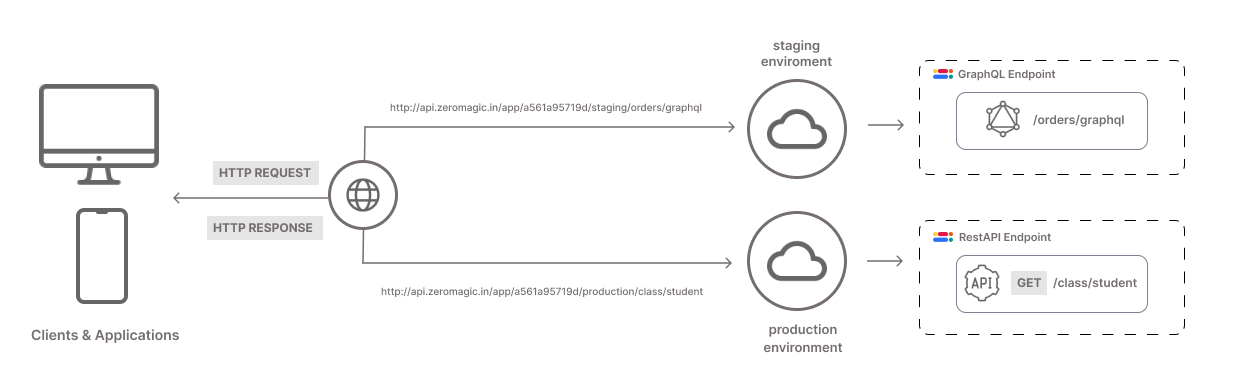
Deployment Process
Once you have created and tested your API, you are ready to deploy it.- For REST API: Simply click the
Deploybutton to push your API to the deployment environments. - For GraphQL: Your API is automatically deployed to the environments after you edit the
Schema.
Access Your API
Choose the environment where you want to access your API (e.g., development, staging, production). For each environment, three URLs are available:- REST AUTH: This URL handles all the authentication requests for the in-built authentication system.
- REST APP: This URL is used to access the APIs you have built.
- GRAPHQL: This URL is used to access the GraphQL APIs you have built.
Example Format
REST AUTH
REST APP
GRAPHQL
- base_url: The base URL provided by your platform. It remains constant across deployments.
- app_id: The
APP IDof your particular project. - env_name: The name of the environment (e.g., dev, staging, prod).
- api_name: The name you assigned to your API during the building process.
a561a95719d24f46b0640f3b342f891e, you want to deploy to the staging environment then, your API will be accessible at:
REST AUTH
REST APP
GRAPHQL
You can copy the API Endpoint from the desired RestAPI/QraphQL builder page.
Benefits
- Simplicity: Deploy your APIs with a single click.
- Efficiency: Manage all your deployments from a central location.
- Scalability: Easily deploy to different environments as needed.
- Reliability: Ensure your APIs are accessible and performant in the desired environment.