> ## Documentation Index
> Fetch the complete documentation index at: https://nocode-docs.zeroagent.io/llms.txt
> Use this file to discover all available pages before exploring further.
# Decision making with if else conditions in workflows
This blog post will guide you through the world of if-else conditions in workflows, making your processes smarter and more efficient.
The if-else condition is a basic programming construct used to execute different actions based on whether a condition is true or false.If-else conditions work similarly in workflow automation.If-else conditions can be used to direct the flow of tasks, handle exceptions, and ensure that the workflow adapts to varying inputs and scenarios.
 ## How IfElse Works:
1. **Set a Condition:** Define a condition that needs to be met, like `Order amount is greater than $100` or `Customer location is in Europe`.
2. **Evaluate the Condition:** The workflow checks if the condition is true or false.
3. **Branch Out:** Based on the outcome, the workflow follows a predetermined path:
* If True: Execute the actions associated with the `true` branch.
* Else: Execute the actions associated with the `else` branch.
## Example Scenario : Check if Order has Discount
Let's consider an e-commerce workflow where we need to check if an order qualifies for a discount. The criteria could be:
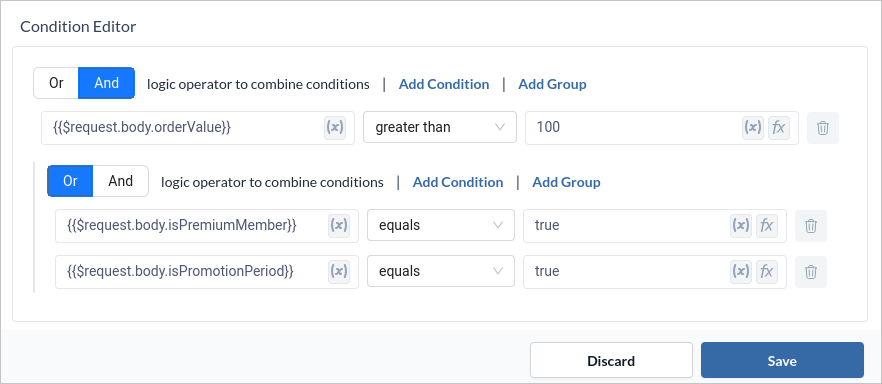
* The total order value exceeds \$100.
* The customer is a premium member.
* The order is placed during a special promotion period.
```jsx Example theme={null}
If (orderValue > 100 && (isPremiumMember || isPromotionPeriod) ) {
// Logic to apply discount
return {"response" : "Discount Applied"}
} else {
// Regular order processing
return {"response" : "Discount Not Applied"}
}
```
### Setting up workflow
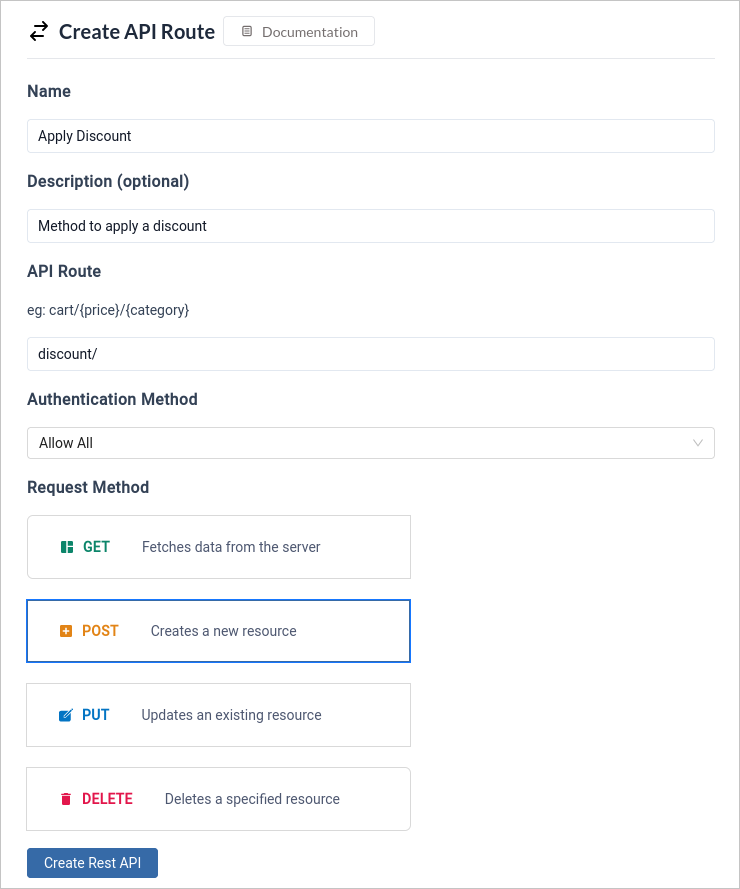
1. Create a `Post` method which will take body data as `orderValue`, `isPremiumMember`, and `isPromotionPeriod`.
## How IfElse Works:
1. **Set a Condition:** Define a condition that needs to be met, like `Order amount is greater than $100` or `Customer location is in Europe`.
2. **Evaluate the Condition:** The workflow checks if the condition is true or false.
3. **Branch Out:** Based on the outcome, the workflow follows a predetermined path:
* If True: Execute the actions associated with the `true` branch.
* Else: Execute the actions associated with the `else` branch.
## Example Scenario : Check if Order has Discount
Let's consider an e-commerce workflow where we need to check if an order qualifies for a discount. The criteria could be:
* The total order value exceeds \$100.
* The customer is a premium member.
* The order is placed during a special promotion period.
```jsx Example theme={null}
If (orderValue > 100 && (isPremiumMember || isPromotionPeriod) ) {
// Logic to apply discount
return {"response" : "Discount Applied"}
} else {
// Regular order processing
return {"response" : "Discount Not Applied"}
}
```
### Setting up workflow
1. Create a `Post` method which will take body data as `orderValue`, `isPremiumMember`, and `isPromotionPeriod`.
 2. Using an if-else, evaluate the combined condition to check if the combined criteria are met.
 3. Add a JSON block with Action name as `true_json` in True branch with `key=response` and `value=Discount Applied`. Update the Response Block output to `{{$true_json.val}}` and status code to `200`.
```json title="Sample True Response" theme={null}
{
"response": "Discount Applied"
}
```
4. Add a JSON block with Action name as `false_json` in False branch with `key=response` and `value=Discount Not Applied`. Update the Response Block output to `{{$false_json.val}}`and status code to `200`.
```json title="Sample False Response" theme={null}
{
"response": "Discount Not Applied"
}
```
3. Add a JSON block with Action name as `true_json` in True branch with `key=response` and `value=Discount Applied`. Update the Response Block output to `{{$true_json.val}}` and status code to `200`.
```json title="Sample True Response" theme={null}
{
"response": "Discount Applied"
}
```
4. Add a JSON block with Action name as `false_json` in False branch with `key=response` and `value=Discount Not Applied`. Update the Response Block output to `{{$false_json.val}}`and status code to `200`.
```json title="Sample False Response" theme={null}
{
"response": "Discount Not Applied"
}
```
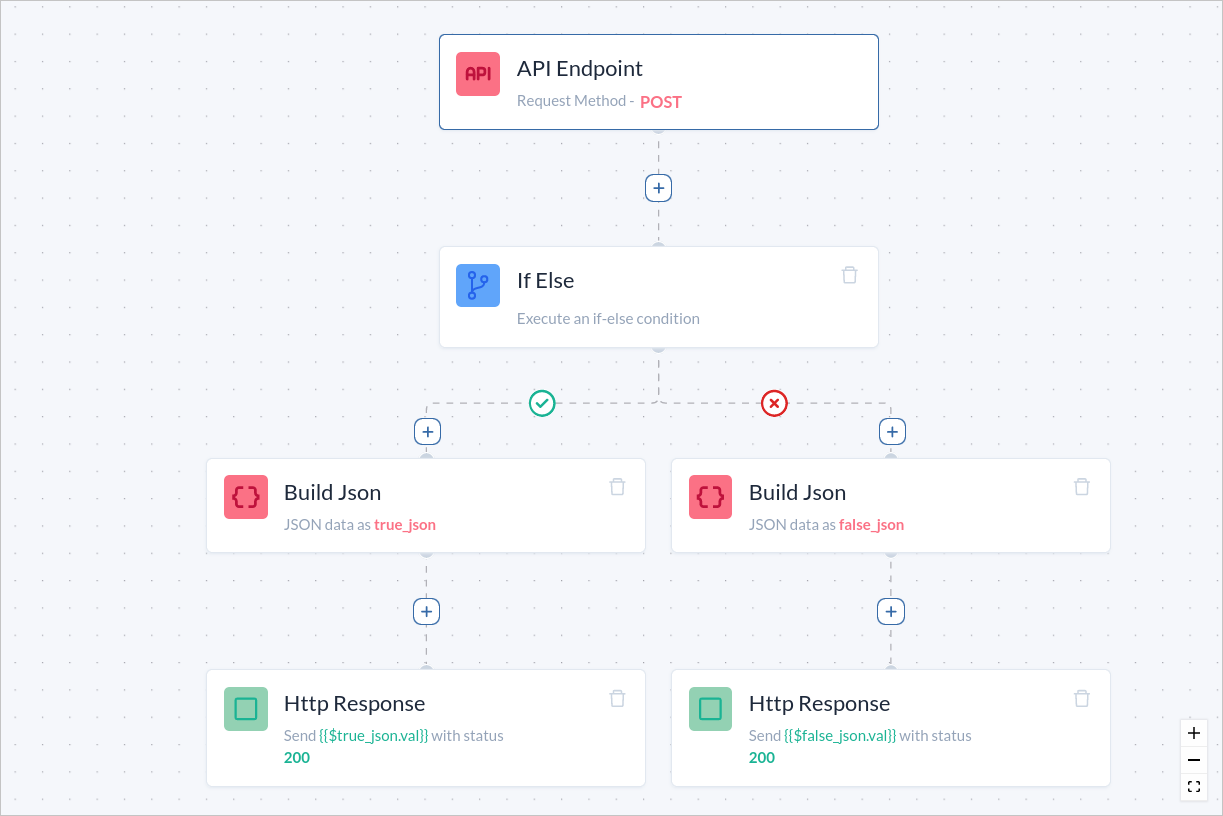 5. Click `Deploy` to update the flow and to utilise your API.
 You can test the API either using `postman` or nagivating to `Logs` section