> ## Documentation Index
> Fetch the complete documentation index at: https://nocode-docs.zeroagent.io/llms.txt
> Use this file to discover all available pages before exploring further.
# Secrets
Secrets are sensitive pieces of information that are vital for the secure functioning of your applications, such as API keys, database passwords, and access tokens. With Zeromagic, you can easily manage these secrets within your environment to ensure security and confidentiality.
## Create Secrets
1. To create a new secret, head to the **Secrets** section in the **project console**.
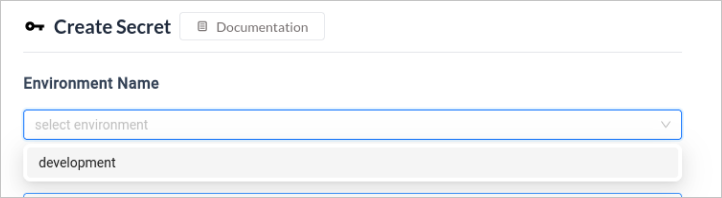
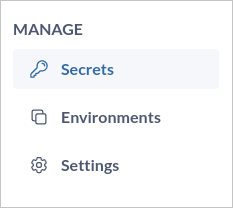 2. Click `Create Secret` and will launch a form to define your secret details.
3. Identify the environment where you want to store the secret. You might need to select a specific environment from a list or menu.
2. Click `Create Secret` and will launch a form to define your secret details.
3. Identify the environment where you want to store the secret. You might need to select a specific environment from a list or menu.
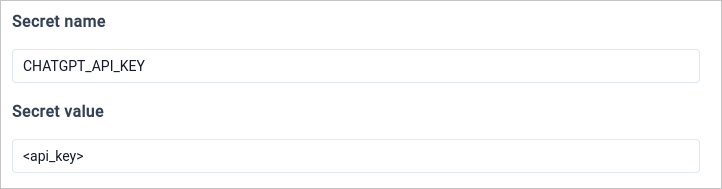
 4. Choose a *"name"* that clearly identifies the purpose of the secret.
5. Input the *"value"* that the secret represents.
4. Choose a *"name"* that clearly identifies the purpose of the secret.
5. Input the *"value"* that the secret represents.
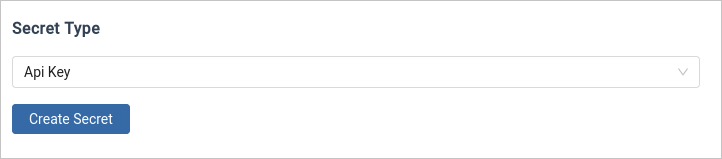
 6. Select the type of secret from the dropdown. You can check the available [**secret types here**](#available-secret-types).
7. Click on `Create Secret` and your secret will be created.
6. Select the type of secret from the dropdown. You can check the available [**secret types here**](#available-secret-types).
7. Click on `Create Secret` and your secret will be created.
 ## Delete Secret
To permanently delete a secret, click the **Delete** button next to the key you want to remove. This action cannot be undone.
## Delete Secret
To permanently delete a secret, click the **Delete** button next to the key you want to remove. This action cannot be undone.
 ## Available Secret Types
1. **Password :** Passwords are used for user authentication purposes. They grant access to protected systems, databases, or applications.
2. **Token :** Tokens are short-lived pieces of data used for authentication or authorization. They often act as temporary credentials for accessing resources.
3. **API Key :** API keys are unique identifiers used to authenticate applications or users when interacting with APIs.
4. **Basic Auth :** Basic authentication is a simple authorization scheme that transmits credentials (username and password) directly within the request header.
## Available Secret Types
1. **Password :** Passwords are used for user authentication purposes. They grant access to protected systems, databases, or applications.
2. **Token :** Tokens are short-lived pieces of data used for authentication or authorization. They often act as temporary credentials for accessing resources.
3. **API Key :** API keys are unique identifiers used to authenticate applications or users when interacting with APIs.
4. **Basic Auth :** Basic authentication is a simple authorization scheme that transmits credentials (username and password) directly within the request header.