> ## Documentation Index
> Fetch the complete documentation index at: https://nocode-docs.zeroagent.io/llms.txt
> Use this file to discover all available pages before exploring further.
# Deployment
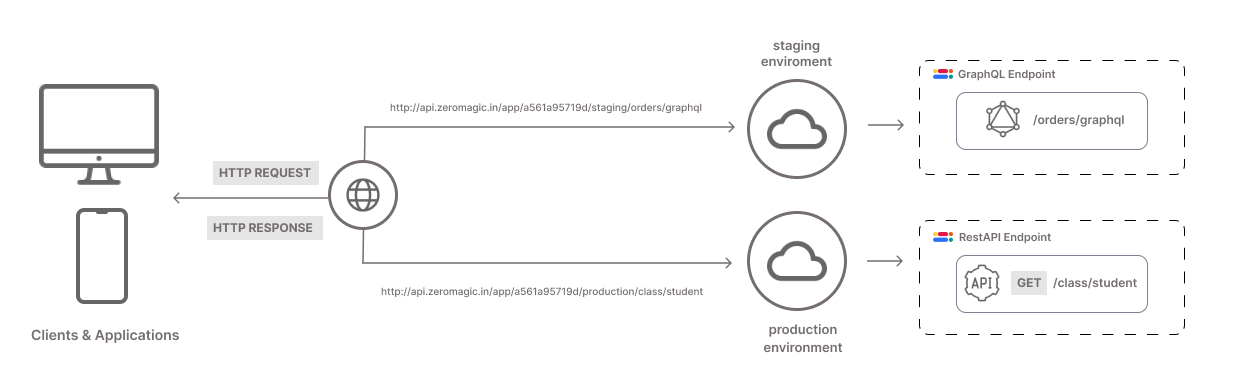
Our platform offers a streamlined deployment feature that allows you to easily push your APIs to the desired environment. With just one click, you can manage your deployments efficiently and access your APIs through a simple URL format.
 ## Deployment Process
Once you have created and tested your API, you are ready to deploy it.
* For [**REST API**](/restapi/overview): Simply click the `Deploy` button to push your API to the deployment environments.
* For [**GraphQL**](/graphql/overview): Your API is automatically deployed to the environments after you edit the `Schema`.
## Access Your API
Choose the environment where you want to access your API (e.g., development, staging, production). For each environment, three URLs are available:
* **REST AUTH**: This URL handles all the authentication requests for the in-built authentication system.
* **REST APP**: This URL is used to access the APIs you have built.
* **GRAPHQL**: This URL is used to access the GraphQL APIs you have built.
### Example Format
```jsx REST AUTH theme={null}
{base_url}/auth/{app_id}/{env_name}/{api_endpoint_path}
```
```jsx REST APP theme={null}
{base_url}/api/{app_id}/{env_name}/{api_endpoint_path}
```
```jsx GRAPHQL theme={null}
{base_url}/{app_id}/{env_name}/{api_endpoint_path}/graphql
```
* **base\_url**: The base URL provided by your platform. It remains constant across deployments.
* **app\_id**: The `APP ID` of your particular project.
* **env\_name**: The name of the environment (e.g., dev, staging, prod).
* **api\_name**: The name you assigned to your API during the building process.
If your App ID is `a561a95719d24f46b0640f3b342f891e`, you want to deploy to the `staging` environment then, your API will be accessible at:
```jsx REST AUTH theme={null}
https://authn.zeromagic.cloud/auth/a561a95719d24f46b0640f3b342f891e/staging/email-password-login
```
```jsx REST APP theme={null}
https://api.zeromagic.cloud/api/a561a95719d24f46b0640f3b342f891e/staging/create-todo/
```
```jsx GRAPHQL theme={null}
https://api.zeromagic.cloud/a561a95719d24f46b0640f3b342f891e/staging/todo/graphql
```
You can copy the API Endpoint from the desired RestAPI/QraphQL builder page.
## Benefits
* **Simplicity**: Deploy your APIs with a single click.
* **Efficiency**: Manage all your deployments from a central location.
* **Scalability**: Easily deploy to different environments as needed.
* **Reliability**: Ensure your APIs are accessible and performant in the desired environment.
## Deployment Process
Once you have created and tested your API, you are ready to deploy it.
* For [**REST API**](/restapi/overview): Simply click the `Deploy` button to push your API to the deployment environments.
* For [**GraphQL**](/graphql/overview): Your API is automatically deployed to the environments after you edit the `Schema`.
## Access Your API
Choose the environment where you want to access your API (e.g., development, staging, production). For each environment, three URLs are available:
* **REST AUTH**: This URL handles all the authentication requests for the in-built authentication system.
* **REST APP**: This URL is used to access the APIs you have built.
* **GRAPHQL**: This URL is used to access the GraphQL APIs you have built.
### Example Format
```jsx REST AUTH theme={null}
{base_url}/auth/{app_id}/{env_name}/{api_endpoint_path}
```
```jsx REST APP theme={null}
{base_url}/api/{app_id}/{env_name}/{api_endpoint_path}
```
```jsx GRAPHQL theme={null}
{base_url}/{app_id}/{env_name}/{api_endpoint_path}/graphql
```
* **base\_url**: The base URL provided by your platform. It remains constant across deployments.
* **app\_id**: The `APP ID` of your particular project.
* **env\_name**: The name of the environment (e.g., dev, staging, prod).
* **api\_name**: The name you assigned to your API during the building process.
If your App ID is `a561a95719d24f46b0640f3b342f891e`, you want to deploy to the `staging` environment then, your API will be accessible at:
```jsx REST AUTH theme={null}
https://authn.zeromagic.cloud/auth/a561a95719d24f46b0640f3b342f891e/staging/email-password-login
```
```jsx REST APP theme={null}
https://api.zeromagic.cloud/api/a561a95719d24f46b0640f3b342f891e/staging/create-todo/
```
```jsx GRAPHQL theme={null}
https://api.zeromagic.cloud/a561a95719d24f46b0640f3b342f891e/staging/todo/graphql
```
You can copy the API Endpoint from the desired RestAPI/QraphQL builder page.
## Benefits
* **Simplicity**: Deploy your APIs with a single click.
* **Efficiency**: Manage all your deployments from a central location.
* **Scalability**: Easily deploy to different environments as needed.
* **Reliability**: Ensure your APIs are accessible and performant in the desired environment.